Complete Anatomy
- 3.4
- Rating
- 1.00M
- Installs
- Free
- Price

 Analysis by App-foxy
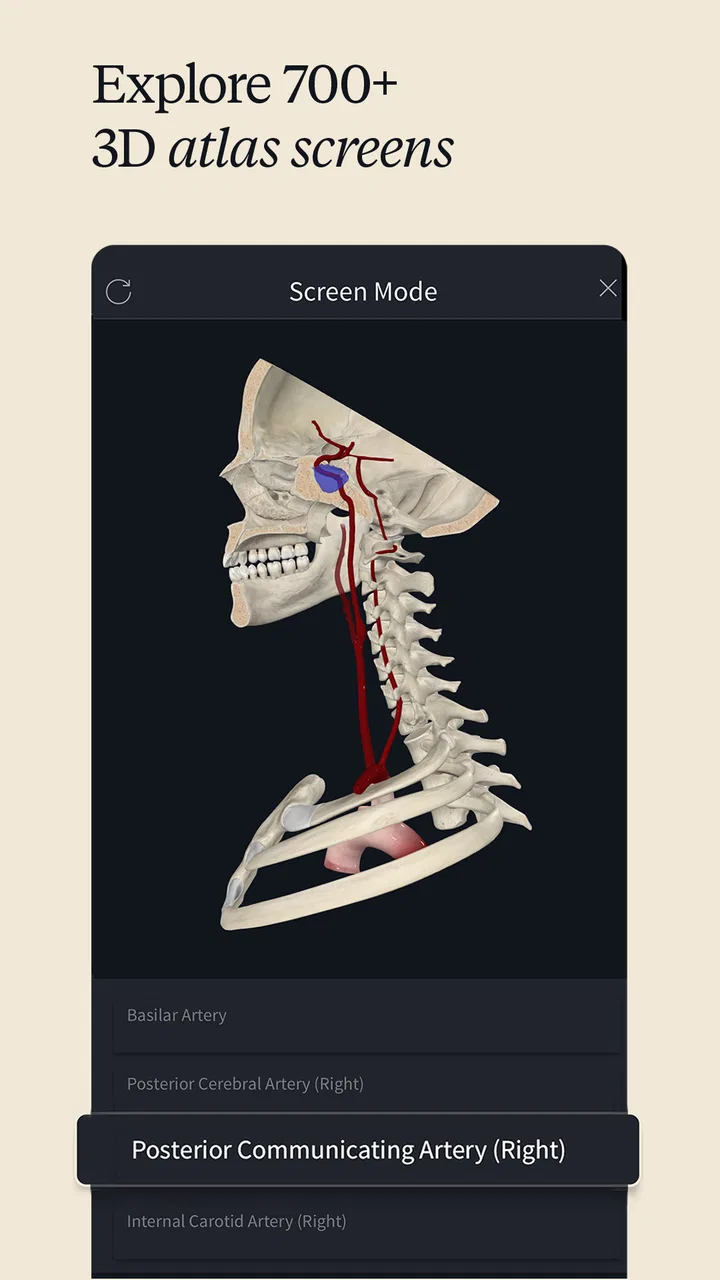
When I first opened Complete Anatomy, I did not treat it like a quick reference app. I approached it as a visual study tool for moments when a flat diagram or a rushed web search would leave too many questions unanswered. That distinction matters. This medical app is built around a three-dimensional human body atlas and courses, and its strongest quality is the way it lets me move from a broad view of the body toward a more focused examination of individual structures.
It comes from 3D4Medical from Elsevier and is available free of charge, with optional in-app purchases ranging from $0.99 to $119.99 per item. The app is rated for Everyone, which makes it approachable for a wide audience, although the subject matter is obviously more useful to students, educators, health professionals, fitness specialists, and curious learners than to someone looking for a simple symptom checker. With more than a million installs, it has clearly found a substantial audience, yet its average rating of 3.4 suggests that the experience is not equally smooth for everyone.
Starting with a question rather than a textbook
The most useful way to begin is with a specific question. I would not open it expecting it to teach the entire body in one sitting. Instead, I might start with a question such as, “Which muscles are involved around the shoulder?” or “How does this joint fit together?” A focused starting point makes the three-dimensional interface feel purposeful rather than overwhelming.
You May Also Like

 Blood Strike: 2.5 Anniversary
Blood Strike’s Loadouts Turn Every Drop Into a Tactical Gamble
A close look at Blood Strike’s custom loadouts: how fast access to signature weapons reshapes its battle royale rhythm, rewards preparation, and narrows the gap between fights.

 Pandora - Music & Podcasts
Pandora’s Music Is Easy to Start, but Harder to Recover
Pandora’s strength is its low-effort path from a seed to a station. Its weak spot is how much confidence it asks you to place in connection, setup, and quiet recovery.

 8 Ball Pool
 Is Built on Rivalries, Rematches, and Routine
A close look at the rivalries, rematches, shared routines, and unanswered safety questions that turn a quick pool match into a persistent mobile community.

 Samsung Music
’s Quiet Strength Is Playing What You Already Own
Its reach comes less from spectacle than from dependable access to a personal library. That simplicity is both the app’s strongest retention engine and its ceiling.

 AccuWeather: Weather Radar
AccuWeather Review: A Quick, Clear Forecast for Everyday Decisions
For everyday plans, the best forecast is the one you can understand quickly. AccuWeather makes rain timing, radar, and local conditions easy to act on, with a few trade-offs.

 Hill Climb Racing
Why Hill Climb Racing Still Turns Crashes Into One More Run
A tiny car, a bumpy hill and one more upgrade: Hill Climb Racing keeps resurfacing because its simple chaos makes every near-miss feel personal.
More From Our News Desk



That is where the app separates itself from ordinary anatomy illustrations. A textbook page gives me a prepared viewpoint, while this kind of atlas invites me to inspect the body from different angles. I can mentally rotate from a front view to a side or rear view, then use the visual layers to understand how structures sit in relation to one another. That spatial relationship is the real reason to use it; memorizing isolated names is easier when I can see what lies above, beneath, or beside the structure I am studying.
I also found it important to set the right expectation about the word “complete.” The app presents a broad anatomy learning environment, but it is not a replacement for clinical training, a diagnostic consultation, or a supervised practical lesson. Its value is explanatory. It helps me build a mental model, check terminology, and prepare for a conversation or class. It should not be used to decide what an injury or illness means.
Following the visual workflow
My usual workflow begins with the whole body, then narrows down. I first orient myself using a recognizable region, such as the torso or a limb. From there, I move closer to the area I need and hide visual clutter when possible. This is more effective than immediately searching for a tiny structure, because the surrounding anatomy gives the name meaning.
The next step is comparison. I look at the same region from more than one direction and then mentally connect the visible structure with its function. For example, when studying a muscle group, I do not stop at identifying its shape. I ask where it begins, where it attaches, what it crosses, and what movement would be affected if it were not working normally. The app is especially helpful at the first part of that process: seeing the arrangement clearly. The functional interpretation still requires a course, a reliable textbook, or guidance from a teacher.
This is one of the app’s less obvious strengths: it can turn passive reading into an active checking routine. Instead of accepting a diagram as fixed, I use the model to test my own understanding. I hide or isolate what I already know, try to identify what remains, and then restore the surrounding layers to see whether my mental map was accurate. That makes a short study session more deliberate than simply scrolling through labeled pictures.
For a student, I would use it before opening lecture notes. First, I would explore the region visually, then read the terminology, and finally return to the model to connect the words with the structures. This order prevents the common problem of memorizing a list without understanding where anything sits. It also makes revision faster because I can revisit the exact region instead of searching through an entire chapter.
Using courses without letting them replace practice
The course material gives the app a more guided side than a standalone anatomy viewer. I see the atlas as the place where I investigate, while the courses provide a possible route through a subject. That combination is useful when I know I need structure but still want the freedom to examine the model from my own angle.
I would not try to rush through a course while also exploring every visible layer. Those are two different activities. A better workflow is to follow a lesson for the main explanation, pause when a structure is introduced, and spend a short period examining it independently. After that, I return to the lesson and check whether my interpretation matches the teaching sequence. This handoff between guided content and self-directed exploration is where the app becomes more than a decorative 3D picture.
There is also a practical trade-off here. The free starting point makes it easy to test whether the teaching style suits me, but users should pay attention to which learning content or tools require an in-app purchase before building an entire study plan around them. The available purchase range is wide, so I would decide based on a specific need rather than unlocking content impulsively. If I only want occasional visual clarification, a paid expansion may not be worthwhile. If I am studying anatomy regularly, the calculation is different.
Another useful habit is to keep a separate list of questions. When the model shows me a structure I recognize but do not fully understand, I write down the uncertainty instead of assuming the visual answer is enough. Later, I can take that question to a lecturer, a textbook, or a healthcare professional. The app works best as the first stage of a learning chain, not the final authority in that chain.
Handoffs between learner, teacher, and patient conversation
The real-world value becomes clearer when the information has to move from one person to another. Imagine a physiotherapy student preparing for a practical discussion about a painful shoulder. Before class, I could use the atlas to review the nearby bones, muscles, and connective structures. In the classroom, I could then ask a more precise question because I had already built a basic spatial picture. The teacher’s explanation would have something concrete to attach to.
A similar handoff can happen in a clinic, but with an important boundary. A patient might use the app to understand a term mentioned during an appointment, then return to the clinician for interpretation. I would never use a model to tell a patient that a particular structure is definitely injured. The visual can explain what a word refers to; it cannot establish the cause of pain, confirm a diagnosis, or determine treatment.
For fitness professionals, the workflow is also specific. An instructor may want to refresh the anatomy behind a movement before explaining it to a client. The app can help show why a joint position changes the visible relationship between muscles and bones. However, a polished 3D model can make the body look more predictable than it is. Real people vary, movement is affected by technique and history, and a visual explanation should not become a promise about what every body will do.
I found that sharing the screen or showing the model to another person is most useful when the conversation already has a clear goal. “Here is the region we are discussing” is productive. “Look at this impressive model” is less so. The app supports communication when I use it to remove ambiguity, especially around terms that are difficult to describe with gestures or ordinary language.
What the workflow produces
The result I get from a good session is not a diagnosis or a certificate of mastery. It is a better internal map. I can usually remember a structure more reliably after seeing how it relates to neighboring structures, and I can return to the same region later without starting from zero. That is a meaningful outcome for revision.
The app is particularly strong when the learning goal is spatial: understanding layers, orientation, attachment areas, or the relationship between a joint and the tissues around it. It is less complete as a source of clinical reasoning. Knowing where something is does not automatically explain why it hurts, how it heals, or which treatment is appropriate.
Its age rating of Everyone makes the interface broadly accessible, but accessibility should not be confused with simplicity. Anatomy itself is demanding, and the three-dimensional presentation can introduce its own learning curve. A beginner may need time to understand how to orient the body, select a region, and distinguish a useful view from visual noise. I would recommend starting with one body area and one question rather than attempting a full-body tour.
The current version is 11.7.1, and the app supports devices running Android 7.0 or later. That makes compatibility relevant before downloading, particularly if the device is older. Even on a compatible phone or tablet, I would prefer a larger screen for serious study. A small display can make detailed exploration tiring, while a tablet gives the model enough room to remain legible beside notes or course material.
Where the flow becomes frustrating
The first point of friction is the difference between opening an app and studying effectively. A large three-dimensional atlas can feel liberating, but it can also leave me wandering. Without a clear task, I may spend time rotating the body without retaining much. The solution is simple but important: decide the region, the structure, and the question before beginning.
The second issue is that visual clarity can encourage overconfidence. A model looks authoritative, and that appearance may tempt users to treat it as a complete explanation of their own body. I consider that a serious limitation for casual health searches. Someone with new pain, swelling, weakness, or another concerning symptom should seek appropriate medical advice instead of trying to match the symptom to an image.
There is also the question of value. Since the app is free to install but includes optional purchases, the free experience should be judged on its own before spending money. I would not recommend paying simply because the graphics are attractive. The purchase makes more sense when it supports a defined need, such as a sustained course of study or a particular teaching workflow. For occasional curiosity, a library book, a reputable educational video, or a clinician’s explanation may be enough.
The average rating of 3.4 from around eleven thousand ratings is a useful reminder to keep expectations balanced. The app’s concept is compelling, but a compelling concept does not guarantee that every user will enjoy the navigation, content access, or device experience. I would treat it as a tool worth testing rather than an automatic recommendation for everyone.
It is also not the best choice for someone who wants instant answers in plain language. A symptom-focused health app may be faster for general education, while a traditional anatomy textbook may be better for uninterrupted reading and citation. Complete Anatomy is the better fit when the missing piece is spatial understanding and I am willing to interact with the material.
Who should make room for it
I would recommend it to anatomy students who learn visually, healthcare learners preparing for classes, educators who need a clearer demonstration than a static image, and fitness professionals refreshing their understanding of movement-related structures. Curious adults can also benefit, provided they approach it as education rather than self-diagnosis.
I would be more cautious about recommending it to a person who is anxious about a symptom and wants reassurance. The ability to inspect a body region in detail may increase worry rather than reduce it. It is also not ideal for someone who dislikes interactive study or wants a simple, linear reading experience. In those cases, a well-organized textbook or guided lesson may be more comfortable.
One final practical tip is to use it as a bridge between sources. Start with the model to establish location, use the course or notes to learn terminology and function, then ask a qualified person about anything clinical. That three-step handoff prevents the most common misuse while preserving the app’s strongest advantage.
After working through that process, I see Complete Anatomy as a capable visual companion rather than an all-purpose medical answer machine. It earns its place when I need to understand how structures fit together, especially before a lesson or a focused discussion. The free entry point is helpful, the subject coverage is ambitious, and the 3D approach can make difficult relationships easier to remember.
My recommendation is therefore conditional but positive: try it if your goal is anatomy learning, begin with a narrow question, and judge the optional purchases against a real study need. Skip it if you want diagnosis, quick symptom advice, or a purely text-based reference. Used with those boundaries, Complete Anatomy can turn a confusing body diagram into a more useful, three-dimensional starting point for learning.
FAQs for Complete Anatomy
01What platforms is Complete Anatomy available on?
Complete Anatomy is available on both Android and iOS platforms. It’s designed to take full advantage of mobile and tablet interfaces, providing an intuitive experience for studying human anatomy. The app is also available on Windows and macOS, making it highly versatile across different devices.
02Is Complete Anatomy suitable for beginners in anatomy studies?
Yes, Complete Anatomy is designed for a wide range of users, from beginners to advanced students and professionals. It offers detailed 3D models and a variety of learning tools, including quizzes and lectures, making it accessible for those new to anatomy as well as those seeking to deepen their understanding.
03Does Complete Anatomy require an internet connection to use?
Complete Anatomy does not require a constant internet connection once it’s installed, making it convenient for offline study. However, some features such as updates, cloud syncing, and accessing certain content may require an internet connection. It's best to download necessary resources in advance when planning to study offline.
04Are there any in-app purchases in Complete Anatomy?
While Complete Anatomy offers a comprehensive free version, certain advanced features and additional content may require in-app purchases or a subscription. This includes access to specific models, detailed lectures, and professional-grade tools. Users should review what’s included in the free version versus paid options to make an informed decision.
05How user-friendly is Complete Anatomy for non-technical users?
Complete Anatomy is designed with an intuitive interface that makes it easy for non-technical users to navigate. The app includes tutorials and guides to help users get started, and its touch-based controls allow for easy manipulation of 3D models. Even those new to digital learning tools will find it approachable.
Pros
- Detailed 3D anatomical models.
- Interactive learning tools available.
- Regularly updated content.
- Supports AR for enhanced study.
- Customizable study modules.
Cons
- Requires substantial storage space.
- Subscription needed for full access.
- Occasional app performance issues.
- Limited offline functionality.
- Complex interface for beginners.

Complete Anatomy
Gallery